 61aab1a8c6
|
||
|---|---|---|
| archive | ||
| photos | ||
| LICENSE | ||
| README.md | ||
| wineorc.sh | ||
README.md





🍷 A simple Shell script to setup ORC private-servers automatically on Linux
This script is not supported, authorized, or afilliated in any way, shape or form by the official devs of these private-servers. (except Placeholder)
wineORC 2.8+ is also not supported, authorized, afilliated, a part of, or maintained by DarDarDar.
Supported Revivals
- Projekt Placeholder (Public & Private)
- IttehBlox
- SyntaxEco (unknown & untested - use at own risk!)
- more can be added via pull request.
⚡ What this does
This script will download dependencies, register URI and install the private-server of choice. It can also install DXVK, and uninstall the revival of choice.
⚠️ Requirements
The needed packages are:
sudo- The latest WINE (preferably wine-staging)
wgetcurl
The script can install WINE for you. However, only some distros are supported, so if it fails then you should install WINE and the other dependencies manually.
💻 How to use it
- Download the latest release from the Releases page (or just clone this repo via git)
- Open a terminal and cd into where the script is downloaded.
- Run
chmod +x wineorc.sh - Run
./wineorc.shand follow the prompts. - Once installed, play a game and it should work!
See ./wineorc.sh --help for all available options.
⬆️ How to update the revival
You should do these steps if the revival has recently been updated:
-
Download the latest Wineorc version (get it from the Releases tab)
-
Run
./wineorc.sh uninstall, then select your revival. Enter your password if prompted. -
Run the script normally.
If the script has an out of date launcher, create an issue and it will be updated. You can also open a pull request with the latest link, and I'll accept it.
❗ Troubleshooting
If the revival crashes/doesn't launch, try to:
- Make sure all necessary optional wine dependencies are installed. You can install them on Arch Linux by running these commands:
sudo pacman -S expac && sudo pacman -S $(expac '%n %o' | grep ^wine)
If you're not on arch, see here for all the dependencies.
- Uninstalling the revival (use
./wineorc.sh uninstalland then select the revival) and then reinstalling it again. (this really can help)
If those don't work, create a Github Issue.
Credits
-
DarDarDar for original wineORC
-
doitsujin/dxvk, licensed under the zlib license
-
Team PlaceholdeR for wineORC 2.7+ builds
-
vl1 for making the Polygon guide
-
calones for helping me, and putting up with me being dumb
-
thexkey for helping me alot making the Placeholder helper
-
itteh, genosmrpg, jackd900, pizzaboxer, kinery and thexkey for making great revivals
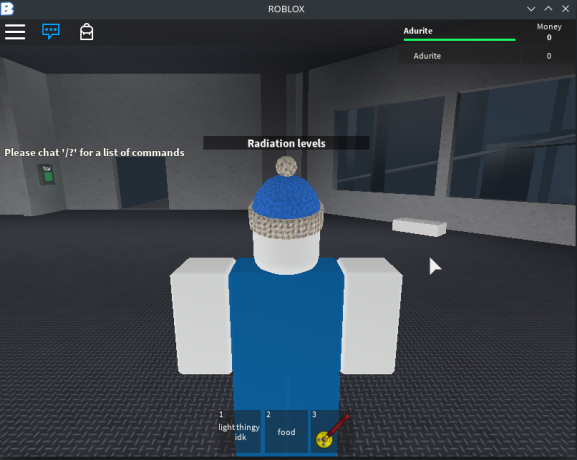
ItteBlox 2016 working on Arch Linux via wineORC